Generate a sample address in Pennsylvania
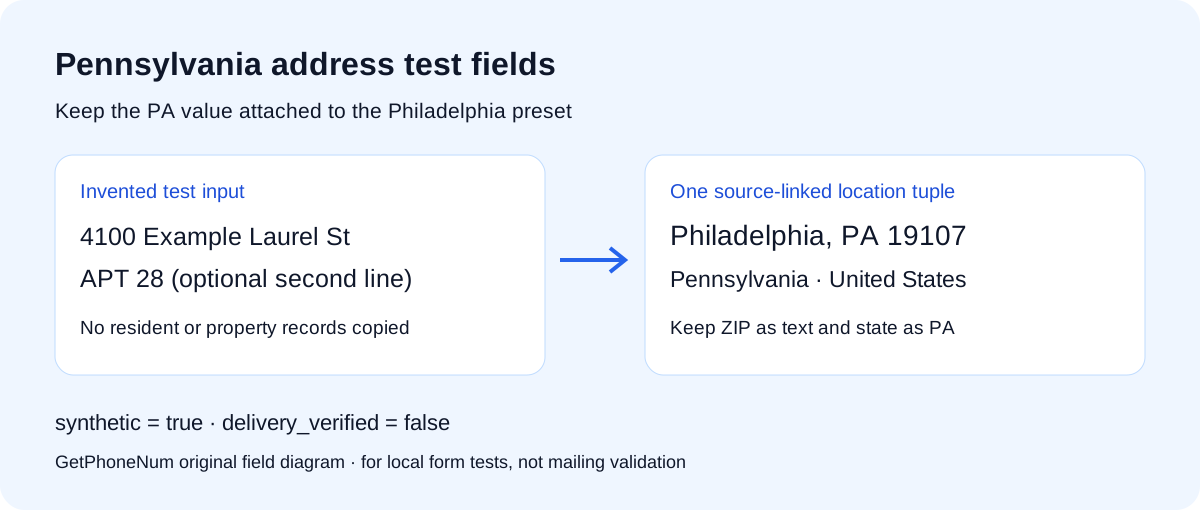
Use this free Pennsylvania address generator for local form tests, interface mockups and small demo datasets. It creates invented street text and an optional apartment while keeping Philadelphia, PA 19107, United States together. The current release uses this one city preset; it is not a complete statewide database.
Choose 1, 5, 10 or 25 records and press Generate address. Copy the formatted result for a design, or download separate fields as JSON or CSV. A seed is optional: the same seed and settings repeat the batch with the same dataset version. Generation and export happen locally in your browser; generated addresses are not submitted to GetPhoneNum.
Test a Pennsylvania state dropdown
A form may display Pennsylvania while storing PA. Treat those as two representations of the same field, and keep the city and ZIP beside them. This page gives you a small, repeatable Philadelphia batch to exercise that conversion.
State display and storage
Import PA into the state selector. Confirm the displayed label is Pennsylvania. Export again and compare the stored value with PA, rather than comparing a full-name label with a two-letter code.
Postal text
Keep 19107 as a five-character string. A successful numeric conversion is not the assertion you need: the export contract expects text. Compare both the value and its type before passing a record to the next test.
Scope isolation
Generate 25 records with apartments enabled. Every row must retain Philadelphia, PA and 19107. Street and unit changes must not cause a city or state change.
This is the location assertion used in our own offline batch check. Apply it to every generated row, then keep street and apartment assertions separate:
row.state === "PA" && row.state_name === "Pennsylvania" && row.city === "Philadelphia" && row.postal_code === "19107"That assertion checks the generator's field contract. It cannot establish that the street exists, that a unit is occupied or that a carrier will deliver mail. The generator uses Example, Test, Sample and Demo street markers so the invented portion remains visible.
What each exported field means
| Field | Value or behavior | Test expectation |
|---|---|---|
| address_line_1 | House number plus invented street | Keep the whole string in the first address line. |
| address_line_2 | Optional APT value | Empty string when units are disabled. |
| city / state | Philadelphia / PA | Do not mix this tuple with another location. |
| state_name | Pennsylvania | Use only where a full state name is expected. |
| postal_code | 19107 | A string, not a numerical quantity. |
| country | US | Explicit country context. |
| synthetic / delivery_verified | true / false | Keep the interpretation flags with the fixture. |
Exports also retain dataset_version and location_source. Save them beside a seed when recording a test failure. Within one batch, the generator samples distinct street/house slots; that does not promise uniqueness across separate runs. CSV quotes handle field boundaries, so use a CSV parser and import postal values as text.
Source and coverage of the Philadelphia preset
The Philadelphia 311 documents the combination Philadelphia, PA 19107. Our dataset uses only that city/state/ZIP combination. It does not reproduce the office street address, copy residents or import property records.
The ZIP is one sourced preset, not a code for every address in Philadelphia or Pennsylvania. Pairing it with invented street text creates a test sample, not a validated postal address. USPS Publication 28 describes complete, standardized addresses in relation to postal address files. A matching format alone does not provide that validation.
Pennsylvania address generator FAQ
Are these real Pennsylvania addresses?
No verified delivery address is produced. The city/state/ZIP combination is sourced, while the street and optional unit are invented test text. No residence, property or mailbox is checked.
Does this cover every address in Pennsylvania?
No. This release has one Philadelphia city/state/ZIP preset. It does not enumerate Pennsylvania towns, postal routes, residents or properties.
Can I use the result for shipping or proof of residence?
No. Use the actual authorized recipient or residence information for those purposes. This tool supplies fixtures for offline tests and demos.
Can I repeat a generated batch?
Yes. Expand the seed control, enter a label, and keep the seed, quantity and apartment choice. Repeat with the same dataset version. Without a seed, pressing Generate creates a fresh sample.
Do I need to register or install anything?
No. Use this page in a browser with JavaScript enabled. Copy, JSON and CSV controls work locally.
Other address presets
Use the US address generator to choose across the available city presets, or the Los Angeles page for California samples. Other state pages: Alabama · Tennessee · Washington.
Published October 8, 2026 · Location dataset version 2026-10-07.